| News Feed |
 | Jobs Feed |
Sections
|
| feed this: |  |
Wojciech Sznapka: Export colored Behat scenarios to PDF
by Chris Cornutt September 04, 2012 @ 09:42:49
Wojciech Sznapka has shares his technique for creating colorized exports of Behat tests for use in PDF files:
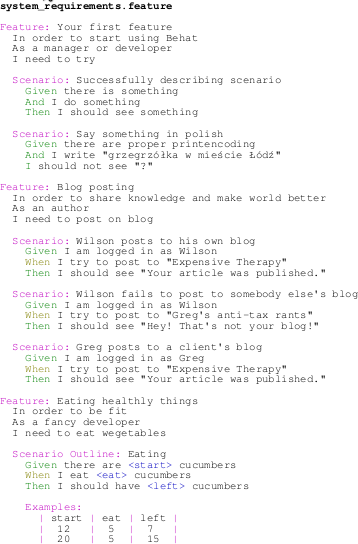
Behat scenarios are one of the best ways to describe system. UML Use Cases or tons of pages in SRS documents are fine, but hard to understand from the begining, and even harder to maintain in the future. Behat eases this process and also gives opportunity to automate requirements verification. To write Behat scenarios you need a text editor. I've picked my favourite - Vim, which highlights *.feature files syntax. But business people mostly don't use Vim, so I need to figure a way, to expose scenarios in easy and pleasant way.
His solution involves setting up some printing options in vim to export the tests as a Postscript file, setting the "colorscheme" to the default setting so the colors will be retained. The result is exported (via the "hardcopy" command) and can be converted into a PDF (with a result like this).
voice your opinion now!
behat test color export postscript pdf print
.Net Magazine: Create an SVG data visualization with PHP
by Chris Cornutt September 13, 2011 @ 12:13:25
On the .net magazine site (yes, really) there's a recent post from Brian Suda about creating SVG images with PHP thanks to the GD functionality that's included in every release.
If you're working online, then canvas springs to mind. It allows you to draw raster graphics quickly and easily. If you want, there are also plenty of image code libraries that can generate GIFs, JPEGs and PNGs on request. But what if your target isn't always online? What if you're aiming for print? Then you could use a raster graphic, but it would need to be pretty large. A better solution is to create a vector-based image format from your code. This is where SVG (Scalable Vector Graphics) steps in.
He starts by explaining a bit about SVG and what it is for those that haven't worked with it before. He givesn an example of a poster from Wired showing circles with colors from their covers over the last 15 years. He shows how to do something similar with images of the .net magazine covers, pulling out the color frequency with the imagecolorat function. Toss in a bit of markup and some formatting of the color output and you'll get circles with concentric rings with the most prominent colors ending up the largest. You can see his result here.
voice your opinion now!
svg tutorial gd image color frequency
Sameer Borate's Blog: Generating a color palette from a image in php
by Chris Cornutt June 21, 2011 @ 13:09:38
Sameer Borate has posted a simple method for creating a color palette from a given image using just PHP and GD.
In the previous post we saw how we can generate a screenshot from a url. In this post we will see how we can create a color palette of the screenshot (or any other image for that matter) using PHP and GD. This can be useful if you need to quickly get the color scheme of a website or a image. Below are a few example images and their palettes generated using the program.
With the help of his code it's as easy as a call on a GetMostCommonColors object (get_color) to return the hex codes for the values found most. Also included in the post is a sample snippet showing how to pull the details from the file and output it in a grid similar to this.
voice your opinion now!
gd image process color palette popular tutorial
WebReference.com: User Personalization with PHP Beginning the Application
by Chris Cornutt February 26, 2009 @ 08:44:25
WebReference.com has kicked off a new series of tutorials today with this first part of their look at building a personalization system as a part of a bookmarking system.
In this tutorial we will build an online bookmark system. This will be used to create a database for storing all our URL's and their descriptions. There are many commercial and non-commercial applications that offer almost the exact functionality that we will create in our application; the difference is that we have full control over our application, allowing us to tweak it to suit our needs.
The application lets users login/logout, manage bookmarks, gives recommendations based on those bookmarks, show some news headlines and, most importantly, the user must be able to personalize their interface with a custom color scheme and image of their choosing.
This first part gets up to the point of creating the databases (a bookmarks and users tables) and creating the basic template wrapper for the entire site.
voice your opinion now!
user personalize application tutorial bookmark image color scheme
Andreas Gohr's Blog: Calculating Color Contrast with PHP
by Chris Cornutt September 19, 2008 @ 09:37:37
In this new post to his blog Andreas Gohr shares three handy functions he's come up with to check colors in an image with PHP.
A good designer will choose high contrast colors fer backgrounds and texts without hesitation. But sometimes no human is involved in choosin' th' colors. For example when colors are assigned in a (pseudo) random manner. [...] After some googlin' I found a page explainin' different color contrast algorithms. Load the cannons! I used th' data from that page and implemented 3 color check functions in PHP.
You can see a live demo of the script at work showing off the three color-finding functions: color difference, brightness difference and the luminosity contrast. There's also a method for calculating the Pythagorean distance between the colors included now too.
voice your opinion now!
color contrast tutorial brightness luminosity
Ibuildings Blog: Implementing Iterators
by Chris Cornutt August 20, 2008 @ 15:02:59
On the Ibuildings blog Ruud Alberts takes a look at iterators - what they are and how they're used (including the objects the SPL makes available).
Let's kickstart this blogpost by defining what an iterator actually is. According to wikipedia, an iterator is. A collection can pretty much be anything. The most obvious sources would be arrays, but other than that, iterations can be done over database resultsets, strings, datetime intervals, directories, file content and XML listings, to name a few.
He looks at the iterator interface that comes bundled in the SPL and how you can create a custom one to loop through your own data collection. He includes an example - a colorful string iterator that "pretties up" an HTML string with various colors.
voice your opinion now!
iterator standard library spl custom color string tutorial
Mikko Koppanen's Blog: Padding thumbnail with color
by Chris Cornutt January 11, 2008 @ 12:05:00
Mikko Koppanen has another image tutorial posted to his blog today - this time the focus is on padding a thumbnail with the color of your choice automatically.
Today's example originates from a question asked by a user. How do I thumbnail the image inside given dimensions proportionally and fill the "blank" areas with a color? Well, the answer is here.
His code pulls in the source image, generates a thumbnail from it and makes a new image (the background) that's a bit bigger than the thumbnail. From there, the thumbnail is laid on top and the whole thing is output as another PNG. An example of the input and output image is included.
voice your opinion now!
imagick padding thumbnail color example imagick padding thumbnail color example
Mikko Koppanen's Blog: Color analysis
by Chris Cornutt November 05, 2007 @ 10:26:00
In the latest entry to his blog, Mikko Koppanen shows how to take the power of Imagick and harness it to check and see what sorts of colors an image contains:
The code in the example reduces the image colors to 10, then discards all but one pixel of every color and then creates the palettes out of those colors. This might not be the most accurate way to do this, but at least it's fast.
His code makes three different "palettes" from the image - average, dark and light - and outputs them as a range of colored boxes for each all of the three palettes. Examples of the output are also included in the post.
voice your opinion now!
imagick color palette average dark light tutorial imagick color palette average dark light tutorial
|
Community Events
Don't see your event here? Let us know!
|